(Republished from an earlier article)
Sales management is the thing most people think of when they think of CRM systems. Qualifying Leads, nurturing prospects, managing Opportunities, and winning that all-important sale. Understanding the connection between Sales Opportunity and CRM is crucial for effective management.
Understanding Sales Opportunity and CRM is vital for any business aiming to optimise its sales processes. By effectively integrating Sales Opportunity and CRM systems, companies can significantly enhance their performance.
But how does it work? And what exactly is the difference between a Lead, a prospect, and an Opportunity? And why am I only putting some of those in capitals?
This blog is here to answer these questions and more. Exploring how a CRM can help improve your sales, what you need to do as a user to achieve this, and the specific tools available in OpenCRM.
In this context, Sales Opportunity and CRM work together to streamline sales activities and improve customer relationships.
This blog post will also explore the concept of Sales Opportunity and CRM, shedding light on how these two elements interact to enhance your sales approach.
Exploring the ways Sales Opportunity and CRM can enhance sales management is crucial for success.
It is important to understand how Sales Opportunity and CRM systems can be tailored to fit your specific sales strategy.
Many organisations are now leveraging the synergy between Sales Opportunity and CRM to drive growth.
So without further ado, let’s jump in:
What is an Opportunity in CRM? (and all the rest)
By understanding the nuances of Sales Opportunity and CRM, businesses can effectively manage their sales pipeline.
Understanding the Importance of Sales Opportunity and CRM
The relationship between Sales Opportunity and CRM cannot be overstated, as it is essential for tracking sales progress and customer interactions.
Sales Opportunity and CRM tools offer features that can significantly improve sales forecasts and performance analytics.
The integration of Sales Opportunity and CRM allows for seamless communication between sales teams and management.
With a solid understanding of Sales Opportunity and CRM, teams can better strategise their approach to potential deals.
Effective use of Sales Opportunity and CRM can lead to improved customer satisfaction and retention rates.
Sales Opportunity and CRM work in tandem to track customer journeys and optimise the sales experience.
By leveraging Sales Opportunity and CRM, businesses can gain insights into market trends and customer behaviours.
Sales Opportunity and CRM systems help streamline the sales process, making it more efficient and effective.
The synergy of Sales Opportunity and CRM creates a more cohesive approach to customer engagement.
Each CRM solution will use slightly different words to refer to each of these elements. And in OpenCRM, if you don’t like the words we’ve chosen, you can always change them through our customisation options.
But in short:
Integrating Sales Opportunity and CRM can lead to more accurate sales predictions and improved revenue generation.
With Sales Opportunity and CRM, organisations can effectively analyse their sales performance and metrics.
Leads
Sales Opportunity and CRM provide the tools necessary for managing leads and converting them into loyal customers.
Utilising Sales Opportunity and CRM helps sales teams align their efforts with overall business goals.
Sales Opportunity and CRM empower businesses to approach each customer interaction strategically.
By focusing on Sales Opportunity and CRM integration, companies can enhance their sales strategies.
Sales Opportunity and CRM allow teams to understand customer needs better and tailor their offerings.
Sales Opportunity and CRM solutions facilitate better collaboration within sales teams.
By embracing Sales Opportunity and CRM, organisations can foster a culture of continuous improvement.
Understanding the dynamics of Sales Opportunity and CRM is vital for adapting to changing market conditions.
Overall, the integration of Sales Opportunity and CRM provides a competitive advantage in the marketplace.
Leads are people you think you might do business with, but that you don’t know very well yet. In OpenCRM, there’s a dedicated module for managing them, separate from your other relationships. It’s there to keep track of the nurturing stage of your sales cycle.
By keeping your Leads separate from your other Contacts, you can easily keep track of how many people make it out of that nurturing stage via conversion.
It is worth pointing out that although OpenCRM has a separate module for Leads, it’s still a part of your overall CRM suite. Once those leads convert, the Leads module automatically passes all the data over to the rest of your OpenCRM system. More about this in a second…
Converting Leads
When you “convert” a Lead, you are saying that you think there is a stronger likelihood of doing business with this person. Everyone has different methods for making this decision, but that’s what it really comes down to.
In OpenCRM, converting a Lead is as simple as clicking a button. Once clicked, your Lead is split into two records: one for the individual (Contact) and one for the business (Company). A third record is also created that is essential for the sales process: the Opportunity (don’t worry, I’m getting there).
Any Emails, Activities, Documents, etc, that were linked to the Lead are carried across to all three of these records. Although you can change this if that doesn’t work for you (there are those customisation options again)
Prospects
Once a Lead has been converted, they become known as a prospect. Prospects are people or businesses that you think stand a good chance of buying from you. The difference between them and Leads is really down to how likely you think that chance is (and maybe how well you know you them).
In OpenCRM, we use the word “prospect” to refer to a particular type of Contact or Company, rather than a standalone entity. So when a Lead is converted the Contact and Company Type field is set to “Prospect.”
But again, you can change this to another word or phrase if it better suits your business (customisation, customisation, customisation)

Don’t just take our word for it
Click to read how other companies have benefited from using OpenCRM. From out-of-the-box implementations to businesses that needed bespoke development to fit their unique approach – we’ve seen it all.find out more
Opportunities
Opportunities (or Potentials in some CRM systems) are a way of managing the piece of business, rather than an individual or company. It is the deal you think you might make and exists to hold the detail of the potential sale. And it’s where your team’s sales skills will really come into their own.
You will use it to keep track of how the deal is progressing, what your potential customer expects from the deal, and how much revenue could be generated.
Opportunities are essential from a business management point of view! They are a way to forecast sales revenue. They are also a great way to help keep your sales team on track through the different stages of your process.
Sales Stages
As your sales team progress through the negotiation with your prospective customer, they will update the Opportunity to reflect what has been discussed and how the estimated amount may have changed. They will also update the Opportunity to reflect what stage this particular sale is at: negotiation, quoting, decision, etc.
In addition to telling you where the Opportunity is in your process, these sales stages can also be used with quite a lot of sophistication in your pipeline and forecasting…but more on that a bit later.
Having a Sales Plan and getting those Opportunity Stages Right
I’ve spoken (written) quite a bit now about your sales process and Opportunities can help you manage it. But where does this sales process or plan come from?
In short, the perfect sales process for your business comes from you.
It is built by you and your team, based on past sales experiences and how your business operates. The point at which you convert a Lead, the fields you have available on your Opportunities module, how these are laid out, the sales stages you use, and so on…

Do we have what it takes?
We don’t restrict which features you have access to in OpenCRM based on how many users you have. You get everything right out of the box. Click to find out if we’ve got the features you need.find out more
Opportunity Management Tools in OpenCRM
The important thing is getting that sales funnel (or process) sorted and being able to track it. In a CRM system, this means making sure you can have:
- The right fields available to document information to you
- Sales Stages that are descriptive and make sense to your team
- Ability to turn on Product Grids within Opportunities to help kickstart the sales process.
- PDF templates configured for your subsequent sales documents (Quotes, Sales Orders, Invoices–including credit invoices)
- eSign facilities and notifications configured for Quotes and/or Sales Orders
- Workflow and Auto Emailing to automate the boring parts of the process
- Reports and Dashboard Graphs to help you track and forecast
Those are tools that you should be able to find in any CRM system with sales and opportunity management functionality.
But when it comes to the features that are the most useful for the team on the ground? Well…I’ve got a few in OpenCRM that I think are unmissable:
Colour Coding and Icons
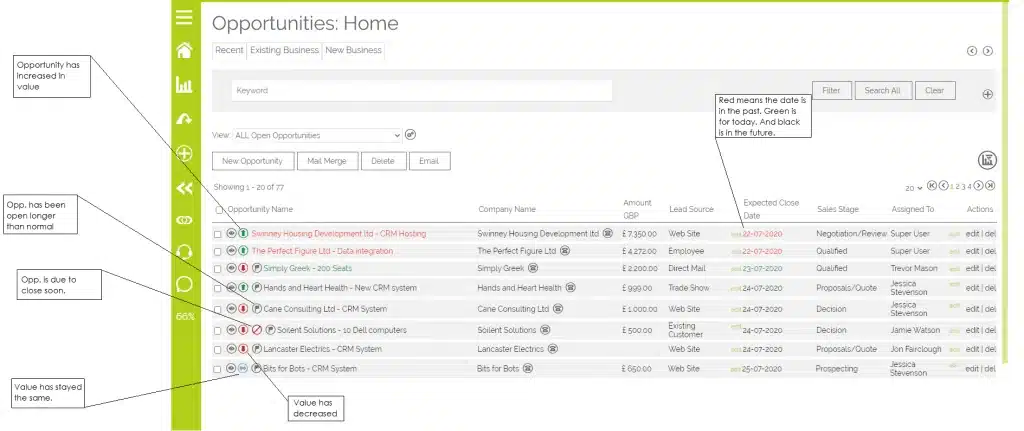
When you first land on the Opportunities module in OpenCRM, the first thing you’ll probably notice is that it is more colourful than the other areas of the system.
And this is entirely on purpose. The various colourful elements on the screen serve to show you, at a glance, where you stand with your ongoing sales.
Active Period
It’s such a small thing, but being able to quickly see how long an Opportunity has been active (without having to do the mental arithmetic is surprisingly useful). Just take a glance to see if it’s been days, weeks, or even months.
That’s useful on its own. But we wanted to take that a step further. So we give admins the ability to define what is a “normal” active period for your Opportunities. Then your system highlights when one of your sales has gone beyond that (see the previous screenshot).
Pipeline Graph
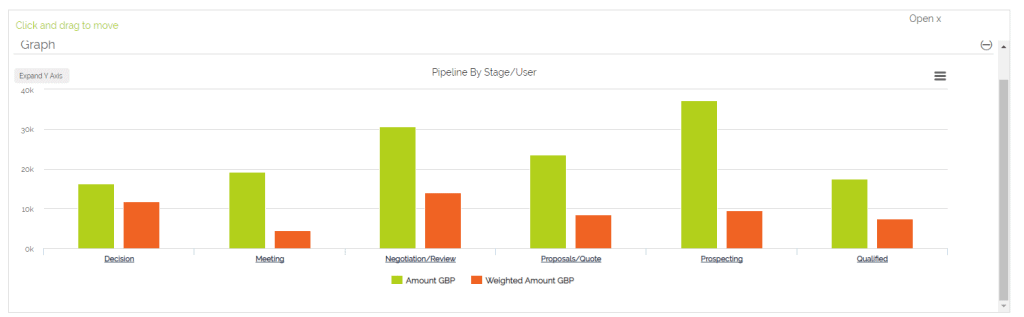
The staple of any sales meeting or review of open Opportunities is the Pipeline graph. It’s a way to see how close you are to your target and identify those Opportunities that look likely to close.
Our own Sales Pipeline Graph lets you view these different lists of Opportunities with a single click.
Sales Stage Extras
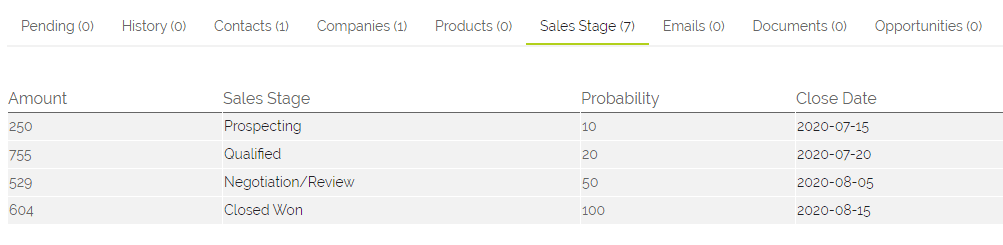
Another really useful feature, especially with Opportunities that have gone on for a while, is being able to see the important changes quickly. Our Sales Stage subtabs show you each time the Sales Stage changed, what the value was, and what the expected close date was.

It also shows the Probability…this is a value tied to your Sales Stages and is entirely customisable. So you can decide what the probability of winning a deal is when you’re at your defined Sales Stages.
This probability is used to calculate the Weighted Amount of your Opportunities.
Forecasting
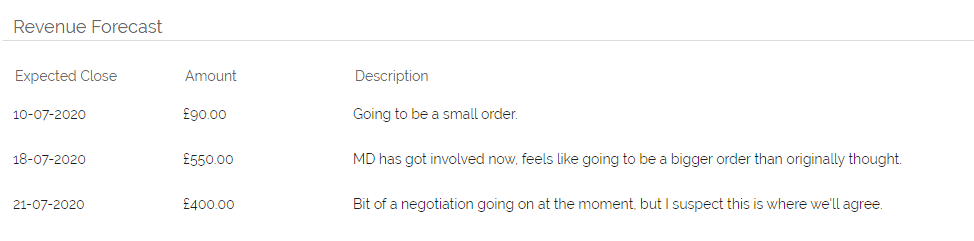
In a similar vein is the ability to Forecast the value of your Opportunities. This is less a reflection of where the negotiations are at and more a way for your sales team to give you their gut impression of how their Opportunities are going.

From a management point of view, it’s an excellent way to get an idea of your new revenue for the coming weeks and months.
Product Grid
This is one of those optional features that’s either absolutely necessary or not used at all…which is why you can switch it ‘on’ or ‘off’ in your Opportunity module (and customise it) depending on how your sales process works.
But being able to add, remove, and tweak the Products linked to a particular deal means that, when the time comes to send out the Quote or Sales Order, it really is a matter of a single click and you’re ready to go.
Dashboard Widgets
And finally, for data and graph nerds like myself, being able to add your own Reports and Graphs to your Dashboard is essential. You can see at a glance what your new Opportunities look like, how the ongoing ones are shaping up, which have been recently won, and those that have been lost.

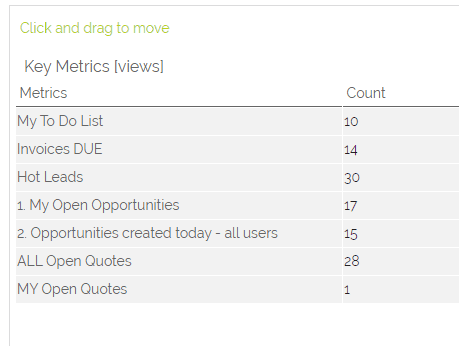
You can also add the number of Opportunities (or other records) that match a certain criteria to the Key Metrics widget. For example, you might want to know quickly how many Opportunities were created today compared to yesterday. Or a whole range of other numbers…but nothing more than just a clear count before diving into the details.

And those are my favourite tools available for managing your sales using OpenCRM Opportunities. If you’d like to chat about these or any way you think CRM could help your sales team, please click in the chat widget in the bottom right corner of your screen. We’d love to hear from you. Alternatively, jump over to our contact page here and drop us a message or call that way.

Want to take it for a test ride?
Nothing compares to trying out a piece of kit for yourself. Click to sign up for a free trial and see if OpenCRM has the look and feel (as well as the features and functionality) that you’re looking for. try it out